01 / INDEPENDENT DEVELOPMENT
FightingEngine
This will be released as free open source project soon.
As it runs on native isolated engine, any characters from any generations of any games can be imported as long as it has animations and bone structure!
Here are some main features of the engine:
- Online play with netcode.
- Local AI training environment, and AI mods (where you can watch two AIs fight each other, or upload your AI to make it fight with others’ AI).
- Character/moveset management.
First I wanted to build faster environment for my Tekken AI project a year ago... and somehow I wanted to build a 3D version of MUGEN next. So here it is!

hitboxes, pushboxes & attack detection
I implemented hitboxes and pushboxes, separating attack contact from the volumes that keep the fighters from passing through each other. This established the collision rules for resolving attacks.
frame advantage & hit levels






I implemented frame advantage and disadvantage, directional evasion, and high, mid, and low attack checks. These clips document the interactions between attack timing, defense, and positioning.
Reaction branches
The same move does not always have to resolve the same way. Entering a specific follow-up within a defined frame window can branch into a second timeline and change the hit properties and resulting reaction.
N depends on the move; this diagram illustrates the branching rule.
Air-combo reactions
All moves were animation-driven. But an airborne opponent can be caught at different heights, at different moments in the fall, and from different distances. Replaying the same reaction animation from its fixed starting pose ignored those differences.
Each new hit could pull the victim back onto the animation’s authored path. The result was the visible snapping below: an air combo that felt like separate, disconnected reactions.
Trajectories
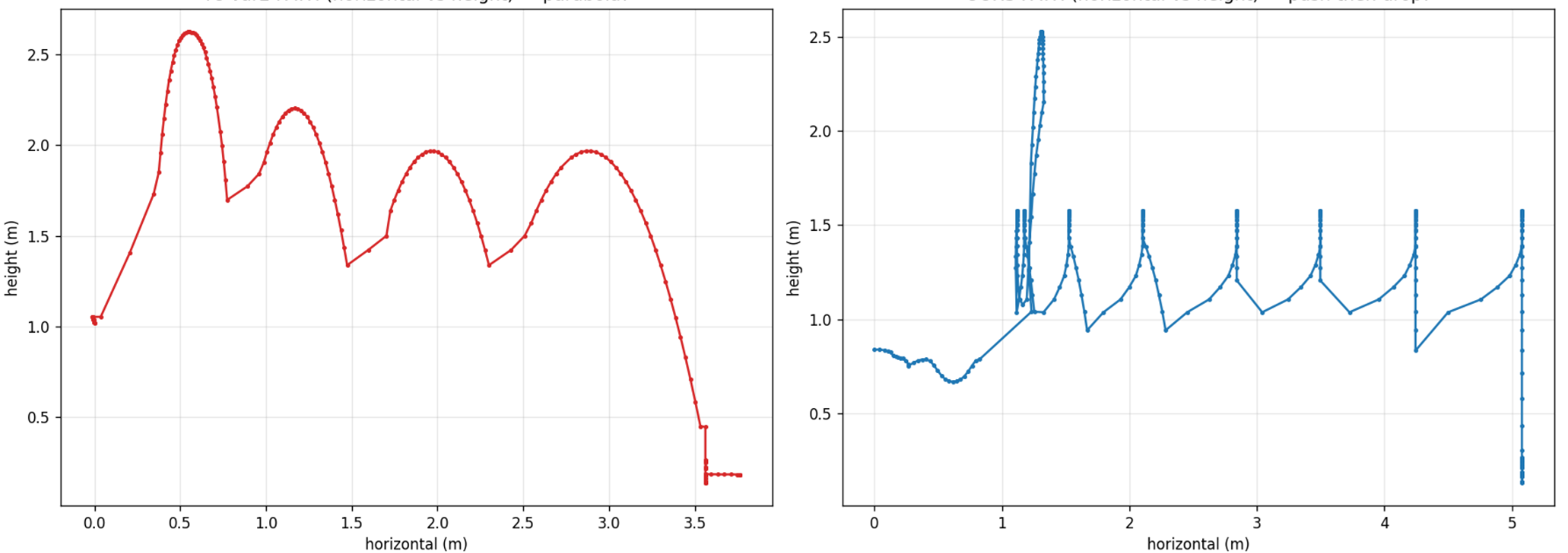
I compared height against horizontal travel to make the discontinuity easier to inspect. The sharp vertical changes expose the mismatch between the height at contact and the reaction’s starting height.
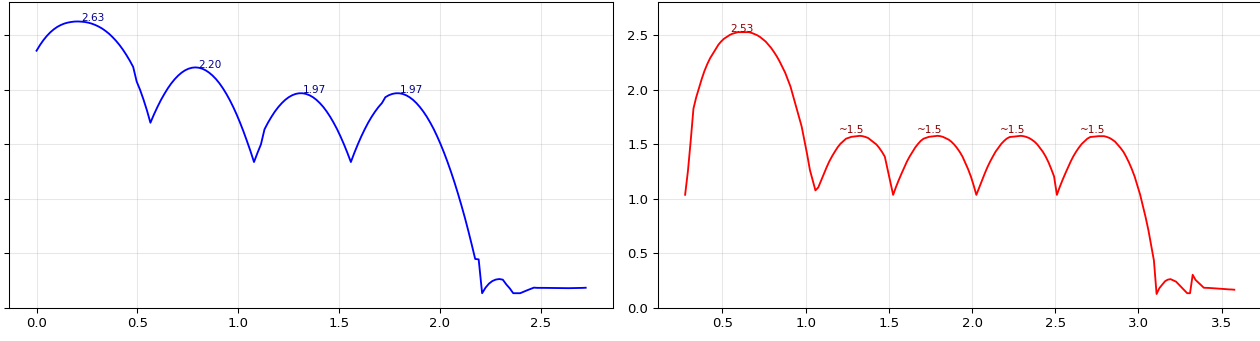
Reaction blending
1. Start from the height where the hit actually connects. At each new air hit, I keep the victim’s previous visual hip height and compare it with the new reaction’s unblended first-frame hip height. Their difference becomes a non-negative vertical offset. The reaction starts from that catch height instead of snapping to its fixed authored start.
2. Fade the offset back onto the authored path. Keeping the offset forever would leave the victim floating above the ground. I reduce it linearly to zero over the first 75.8% of the reaction clip. Different catch heights remain distinct early in the reaction, then converge onto the clip’s landing path.
offset = max(0, catchHeight − clipStartHeight)
weight = clamp(1 − elapsed / (0.758 × duration), 0, 1)
visualHeight = animatedHipHeight + offset × weight
3. Blend the pose without corrupting movement. I blend from the previous pose into the new reaction, including repeated hits that restart the same animation. Root-motion deltas and the first-frame height are read before this blend, so the visual smoothing does not introduce false movement.
The attacks stay animation-driven, while each air reaction is anchored to the actual catch. This addresses the height reset and pose discontinuity without forcing every hit to begin from the same world-space position.
Animation
I create motions in several ways: refining motion-capture footage with keyframe edits, trimming clips, and blending parts of different motions into new movements. The comparison brings together the reference, working motion, and character preview.
Comments
Loading comments…